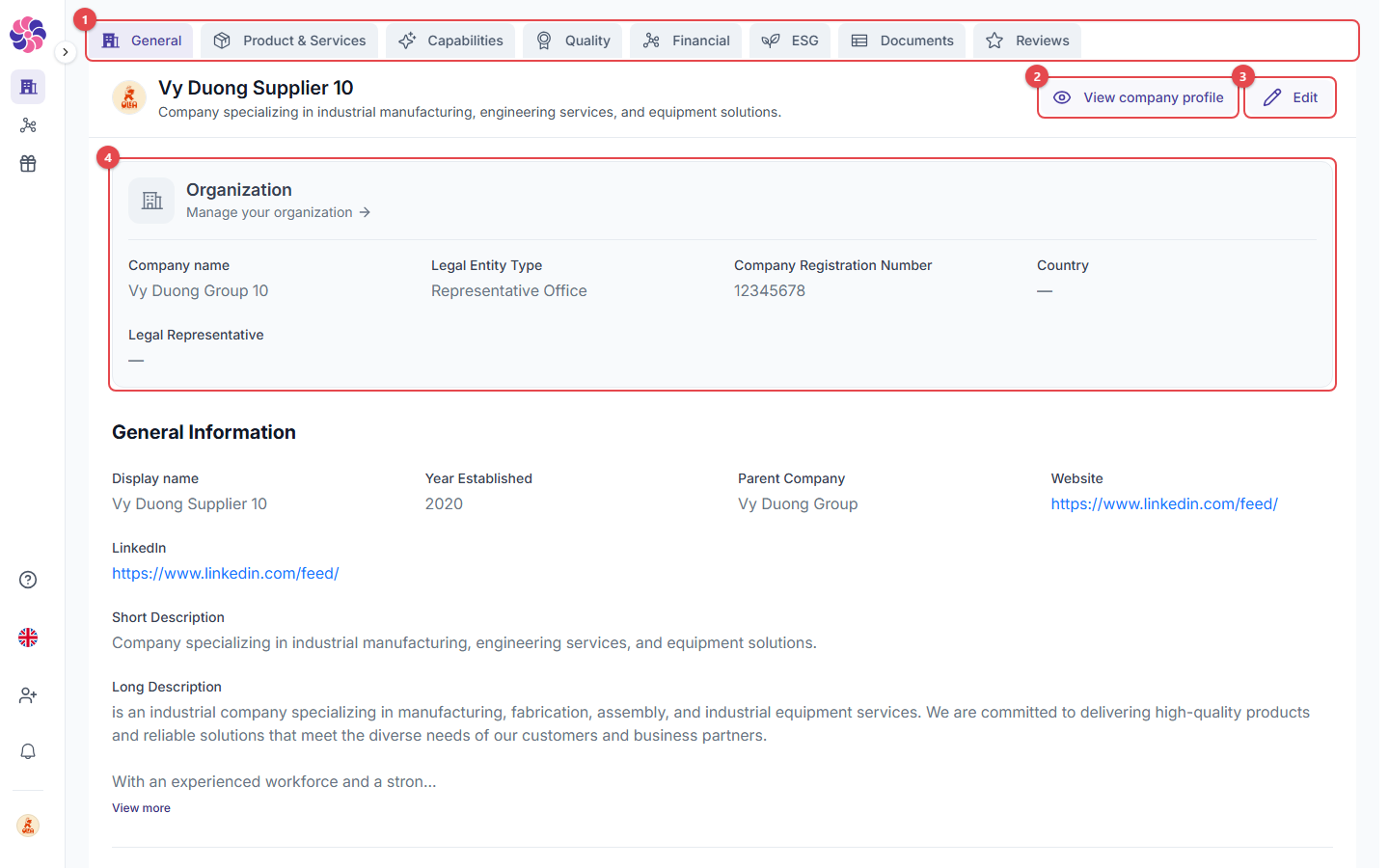
Go to Profile in the sidebar.
- Profile tabs:
- General: company identity, descriptions, location, contacts, logo and cover image.
- Product & Services: your product cards.
- Capabilities: VSIC / NAICS codes, technologies, industries served, past performance, equipment, export/import licenses.
- Quality: quality certifications (e.g. ISO 9001) with dates and certificate files.
- Financial: turnover, employees, payment terms, banking information, tax compliance, financial statements and audits.
- ESG: carbon reporting, environmental/social/governance policies, sustainability certifications, sanctions/PDPD/GDPR/anti-corruption, insurance.
- Documents: all uploaded documents in one place.
- Reviews: reviews written by clients.
- View company profile: see your profile the way clients see it.
- Edit: change the information on the current tab.
- Organization: company-wide details (legal name, legal entity type, registration number, country, legal representative). Click Manage your organization to change them. These details are shared by your Supplier and Client profiles.
The more complete your profile, the higher you appear in search results. The Profile Progress card on your profile shows how complete it is.
Products & services
- Add: create a product card with up to 3 images, a name, 1–3 categories, a description, keywords, a contact email, a PDF white paper (max 10 MB) and video/website links. Use Reorder to change the order the products appear in.
- Product card: this is how buyers see each product or service.
Documents
- Drop your file or browse to add documents (PDF, DOCX or TXT, up to 10 MB). Clients can see them on your profile.
- Upload documents: the uploaded files are listed below this area, grouped as Certifications, Financial and Insurance.
Confidential documents
Choose Mark as confidential on a document to show it only to companies you are connected with. Use Clear confidential to make it public again.
Reviews
- Overall Review: your average score and the number of reviews.
- Invite to review: ask a client to review you.
- Review cards: each review is shown as written by a Verified Buyer. The client’s company name is never shown. Click View full review to read the whole review.
Upload limits