> ## Documentation Index
> Fetch the complete documentation index at: https://docs.supplier-connect.io/llms.txt
> Use this file to discover all available pages before exploring further.
# Manage your supplier profile
> Complete each profile tab, add products and documents, control document visibility, and see your reviews.
Go to **Profile** in the sidebar.
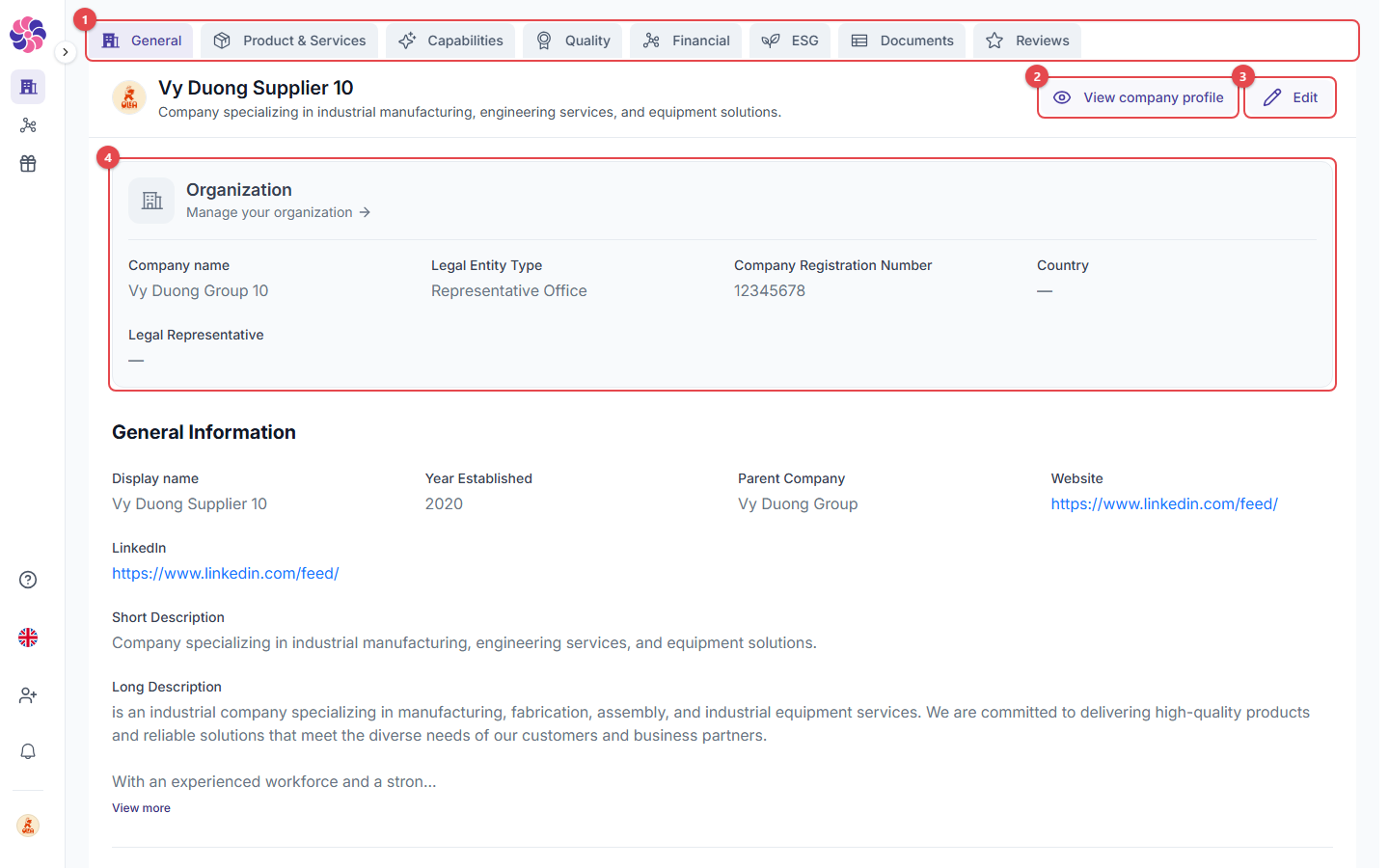 1. **Profile tabs**:
* **General**: company identity, descriptions, location, contacts, logo and cover image.
* **Product & Services**: your product cards.
* **Capabilities**: VSIC / NAICS codes, technologies, industries served, past performance, equipment, export/import licenses.
* **Quality**: quality certifications (e.g. ISO 9001) with dates and certificate files.
* **Financial**: turnover, employees, payment terms, banking information, tax compliance, financial statements and audits.
* **ESG**: carbon reporting, environmental/social/governance policies, sustainability certifications, sanctions/PDPD/GDPR/anti-corruption, insurance.
* **Documents**: all uploaded documents in one place.
* **Reviews**: reviews written by clients.
2. **View company profile**: see your profile the way clients see it.
3. **Edit**: change the information on the current tab.
4. **Organization**: company-wide details (legal name, legal entity type, registration number, country, legal representative). Click **Manage your organization** to change them. These details are shared by your Supplier and Client profiles.
The more complete your profile, the higher you appear in search results. The **Profile Progress** card on your profile shows how complete it is.
## Products & services
1. **Profile tabs**:
* **General**: company identity, descriptions, location, contacts, logo and cover image.
* **Product & Services**: your product cards.
* **Capabilities**: VSIC / NAICS codes, technologies, industries served, past performance, equipment, export/import licenses.
* **Quality**: quality certifications (e.g. ISO 9001) with dates and certificate files.
* **Financial**: turnover, employees, payment terms, banking information, tax compliance, financial statements and audits.
* **ESG**: carbon reporting, environmental/social/governance policies, sustainability certifications, sanctions/PDPD/GDPR/anti-corruption, insurance.
* **Documents**: all uploaded documents in one place.
* **Reviews**: reviews written by clients.
2. **View company profile**: see your profile the way clients see it.
3. **Edit**: change the information on the current tab.
4. **Organization**: company-wide details (legal name, legal entity type, registration number, country, legal representative). Click **Manage your organization** to change them. These details are shared by your Supplier and Client profiles.
The more complete your profile, the higher you appear in search results. The **Profile Progress** card on your profile shows how complete it is.
## Products & services
 1. **Add**: create a product card with up to 3 images, a name, 1–3 categories, a description, keywords, a contact email, a PDF white paper (max 10 MB) and video/website links. Use **Reorder** to change the order the products appear in.
2. **Product card**: this is how buyers see each product or service.
## Documents
1. **Add**: create a product card with up to 3 images, a name, 1–3 categories, a description, keywords, a contact email, a PDF white paper (max 10 MB) and video/website links. Use **Reorder** to change the order the products appear in.
2. **Product card**: this is how buyers see each product or service.
## Documents
 1. **Drop your file or browse** to add documents (PDF, DOCX or TXT, up to 10 MB). Clients can see them on your profile.
2. **Upload documents**: the uploaded files are listed below this area, grouped as Certifications, Financial and Insurance.
### Confidential documents
Choose **Mark as confidential** on a document to show it **only to companies you are connected with**. Use **Clear confidential** to make it public again.
## Reviews
1. **Drop your file or browse** to add documents (PDF, DOCX or TXT, up to 10 MB). Clients can see them on your profile.
2. **Upload documents**: the uploaded files are listed below this area, grouped as Certifications, Financial and Insurance.
### Confidential documents
Choose **Mark as confidential** on a document to show it **only to companies you are connected with**. Use **Clear confidential** to make it public again.
## Reviews
 1. **Overall Review**: your average score and the number of reviews.
2. **Invite to review**: ask a client to review you.
3. **Review cards**: each review is shown as written by a **Verified Buyer**. The client's company name is never shown. Click **View full review** to read the whole review.
## Upload limits
| File type | Formats | Max size |
| - | - | - |
| Images | JPG, PNG, WebP | 10 MB |
| Documents | PDF (or PNG/JPG/DOCX/TXT where stated) | 10 MB |
This documentation is built and hosted on [Mintlify](https://mintlify.com), a developer documentation platform.
1. **Overall Review**: your average score and the number of reviews.
2. **Invite to review**: ask a client to review you.
3. **Review cards**: each review is shown as written by a **Verified Buyer**. The client's company name is never shown. Click **View full review** to read the whole review.
## Upload limits
| File type | Formats | Max size |
| - | - | - |
| Images | JPG, PNG, WebP | 10 MB |
| Documents | PDF (or PNG/JPG/DOCX/TXT where stated) | 10 MB |
This documentation is built and hosted on [Mintlify](https://mintlify.com), a developer documentation platform.