> ## Documentation Index
> Fetch the complete documentation index at: https://docs.supplier-connect.io/llms.txt
> Use this file to discover all available pages before exploring further.
# Review a supplier
> Score a supplier's performance across seven areas and write an anonymous review.
From **My prospect** or **My supplier**, open the **…** menu and choose **Review**. If you have reviewed this supplier before, choose **Update review** instead. The new review replaces your previous one.
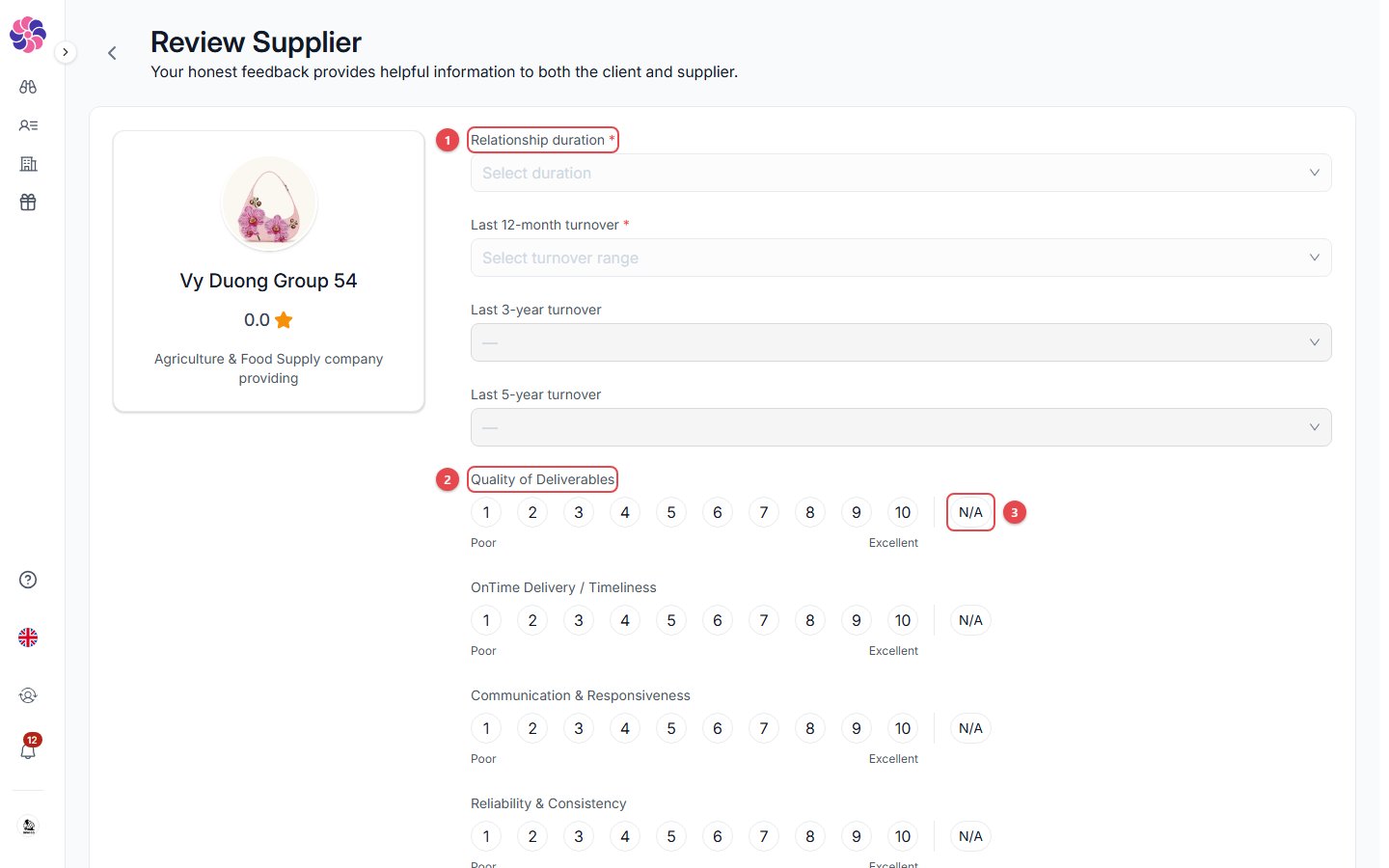 1. **Relationship duration** and **turnover**. The last 12 months is required; 3 and 5 years are optional.
2. **Score each area from 1 (Poor) to 10 (Excellent)**:
* Quality of Deliverables
* On-time Delivery
* Communication & Responsiveness
* Reliability & Consistency
* Price Competitiveness
* Problem Resolution
* Compliance & Documentation
3. **N/A**: use it when you can't judge an area.
Scroll down, write your review, and click **Submit**.
**Reviews are anonymous.** The supplier sees your review as written by a "Verified Buyer", not by your company.
## Review requests by email
If a supplier sends you a review request by email, the link opens this form directly.
This documentation is built and hosted on [Mintlify](https://mintlify.com), a developer documentation platform.
1. **Relationship duration** and **turnover**. The last 12 months is required; 3 and 5 years are optional.
2. **Score each area from 1 (Poor) to 10 (Excellent)**:
* Quality of Deliverables
* On-time Delivery
* Communication & Responsiveness
* Reliability & Consistency
* Price Competitiveness
* Problem Resolution
* Compliance & Documentation
3. **N/A**: use it when you can't judge an area.
Scroll down, write your review, and click **Submit**.
**Reviews are anonymous.** The supplier sees your review as written by a "Verified Buyer", not by your company.
## Review requests by email
If a supplier sends you a review request by email, the link opens this form directly.
This documentation is built and hosted on [Mintlify](https://mintlify.com), a developer documentation platform.